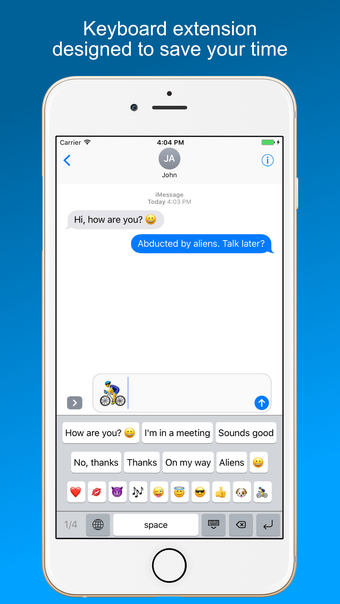
SnippetKeys: A Time-Saving Keyboard Extension
SnippetKeys is a keyboard extension designed to save your time by expanding the iPhone or iPad keyboard with custom text snippets. With SnippetKeys, you can easily access and insert frequently used phrases or pieces of text, such as email addresses, signatures, billing information, message replies, business emails, canned responses, favorite emojis, current date/time, locations, and directions.
In SnippetKeys configuration application, you can create as many keys as you want, organize them by pages, and arrange them using drag-and-drop. Each snippet is represented by a button on the SnippetKeys keyboard, allowing you to instantly type complete phrases with just one tap.
To enable the SnippetKeys keyboard extension, simply follow these steps:
1. Open Settings > General > Keyboard > Keyboards
2. Select "Add New Keyboard"
3. Locate and select SnippetKeys
It's important to note that SnippetKeys is a utility keyboard and does not replace the standard keyboard. You can continue to use the standard keyboard for normal typing and quickly switch to SnippetKeys to insert canned phrases with ease.
SnippetKeys prioritizes your privacy by storing all data locally on your device. Your snippets data and typed information never leave your phone, ensuring that your personal information remains secure. Additionally, the SnippetKeys keyboard extension does not require full access, meaning that your typing is safeguarded by iOS as well.